LOCAL SEO / GOOGLE BUSINESS
Why Is My Business Not Showing Up on Google Maps?
A missing listing, a low position and a website that loses inquiries are different problems. Here is how to work out which one you actually have.
First, define what “not showing up” means
You search for your business, scroll past competitors and wonder whether Google has lost your listing. Before changing the website or rewriting your description, make the search more specific. A profile that has disappeared is a different problem from one that appears by name but struggles to appear for a service.
If your business is not showing on Google Maps, start with your exact business name and city in Google Search and Maps. Then sign in to the Google account that manages the profile and look for any verification or status message. Google describes these starting points in its guide to finding your business.
If the profile is missing, check its status. If it appears by name, investigate the searches you want to appear for. If people already find it, check what happens when they try to contact you.
| What you see | What to check next |
|---|---|
| No profile for the exact business name | Account access, verification and any restriction notice. |
| The profile appears by name, but not for a service | Category accuracy, service information and the searcher's location. |
| Results change between neighborhoods | Record where each search was made before comparing positions. |
| Views or clicks, but few inquiries | Phone, website, booking links and the mobile contact experience. |
Google Business Profile not showing? Check access and status
Open the account associated with the business. If you manage several Google accounts or locations, confirm that you are looking at the right one. Keep a note of the exact message shown; “verification required” and “suspended” are not interchangeable.
Verification is unfinished or requested again
Follow the verification options offered for your profile. Google selects the available methods based on factors such as business type and region; you cannot simply choose a method that is not offered. Its verification instructions are the right reference for the current process.
Save the confirmation and check the status before making unrelated changes. A website redesign would not resolve an outstanding verification request.
Someone else controls the listing
If an existing verified profile belongs to a former employee or provider, use Google's ownership request process. The instructions differ for storefront or hybrid businesses and service-area businesses. Follow the route for your business rather than opening a second listing to get around an access problem.
The profile is suspended or disabled
Review the decision and the policy it cites. Correct the underlying issue, then use the appeal process where available. Google explicitly says not to create a new profile for the same business while pursuing reinstatement. Its suspension guidance explains the evidence and appeal steps.
Keep a record of what you changed and why. That is more useful than repeatedly editing the name, category and address without knowing which issue triggered the restriction.
Verified, but not showing for your services?
Finding your business by its exact name establishes that the profile is visible for that search. It does not establish that Google will show it for every service you offer or everywhere you serve.
Google describes local ranking through relevance, distance and prominence. Relevance concerns the match to a search. Distance concerns the searcher's location. Prominence concerns how well-known the business is, including signals such as links and reviews. See Google's local ranking guidance.
For a Miami business, comparing a search from your own premises with one made in another neighborhood can be misleading. Write down the phrase and location together. Treat each observation as one result under those conditions, not as a single permanent position for the business.
Check the facts before adding more keywords
Does the category describe the actual core business? Are the listed services current? Does the profile send visitors to a website that explains the same offer? Use Edit profile to correct inaccurate hours, contact details or other business information, and confirm how the saved information appears publicly.
Keep the business name consistent with its real-world identity. Google's representation guidelines prohibit unnecessary information in the name and call for accurate addresses and service areas. Adding a string of cities or services to the name is not a substitute for presenting the business accurately.
We would review the profile alongside the website, rather than treating either in isolation. Our Miami local SEO service explains the scope of that work; this guide is the first diagnostic step.
Make the website answer the next question
Once someone reaches the website, their task changes. They need to decide whether you provide the right service, cover their location and offer a workable next step. A clear profile can still send them to an unclear page.
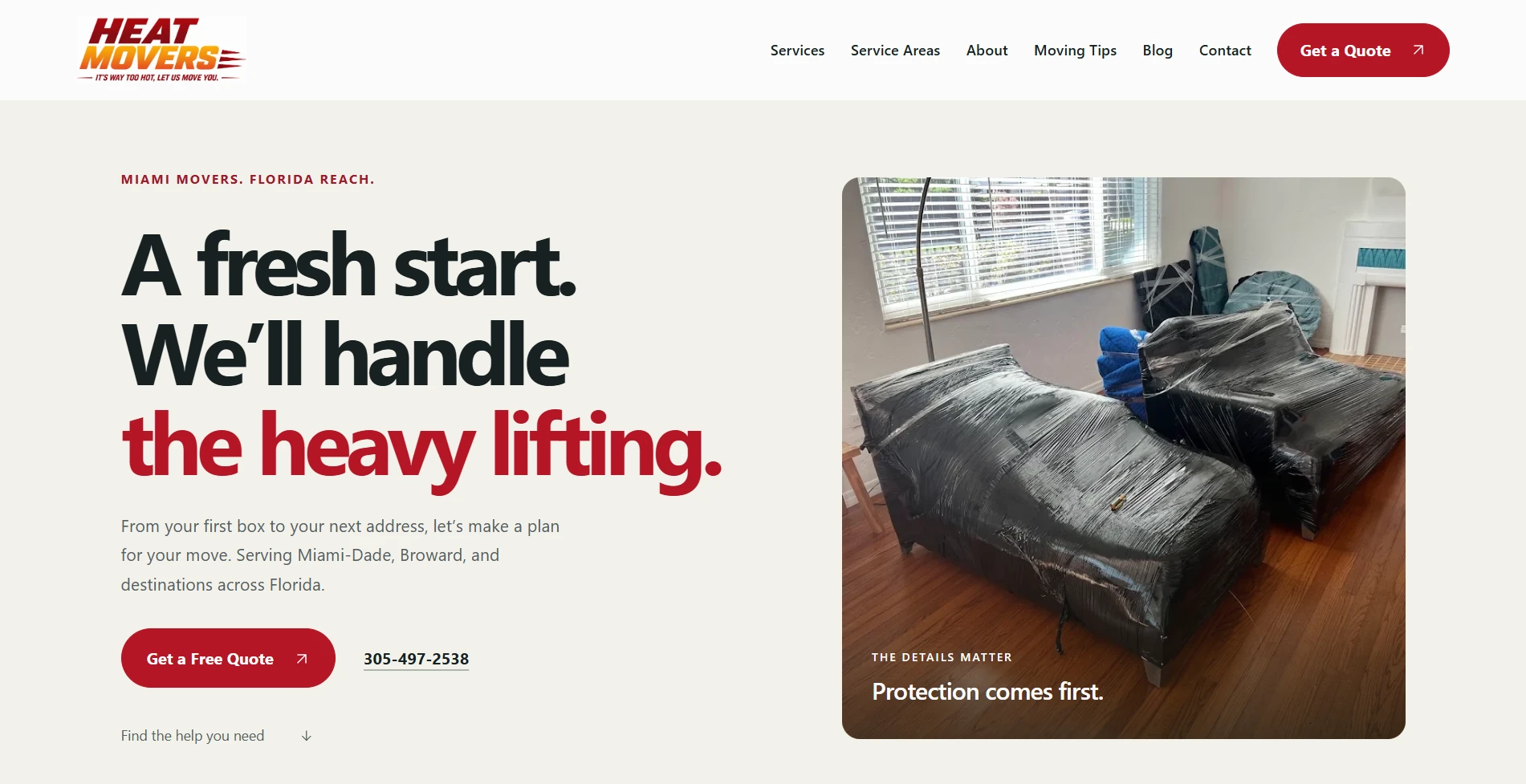
Heat Movers: make the service area understandable
For Heat Movers, FMD brought moving services, Miami-Dade and Broward service-area information, moving guides and quote inquiries into one website. That gives a prospective customer useful context for a moving request: what help is available and what information to provide.
Visit the Heat Movers website and compare that approach with a page that only repeats “Miami movers” without explaining the service. The practical lesson is about answering a customer's question, not reaching a keyword count.
Tony’s PC Repair: make an inquiry easier to describe

The Tony’s PC Repair project presents services alongside an interactive computer explorer, custom-build planning and a quote form. Visitors can explain the help they need instead of trying to fit every request into a vague message.
These examples demonstrate our website work. They do not establish a Maps ranking improvement or a measured increase in leads. Use them to evaluate your own next step: can a visitor understand the offer and send an appropriate inquiry from a phone?
Check inquiries as well as visibility
Google Business Profile's Performance report can show how people discover the profile and which actions they take. Available metrics vary, and Google notes that the report can include activity from both organic results and Google Ads. Keep that distinction in mind when reviewing a change. Read Google's metric definitions.
Choose a date range and record what is available. Then compare it with your actual inquiry records. A click on a phone button is not the same as a completed conversation, and a website visit does not tell you whether the person submitted a form.
On your own site, check the phone destination, open the booking link and verify that a clearly labeled test inquiry reaches the intended inbox. Remove or mark your test record so it is not counted as a customer.
Keep a short change log. Record the original problem, the correction and the date. If inquiries improve, investigate the source and quality of those inquiries before attributing the result to a particular edit.
Leave with a diagnosis, not a longer to-do list
Use the Google Maps visibility worksheet to capture the search phrase, search location, profile status and contact-path checks. It is a plain-text file you can save, print or share with the person helping you.
Choose the next action from the evidence. An access problem needs account recovery. A restriction needs its stated issue addressed. An inaccurate service description needs correction. A broken contact path needs repair. Trying all four at once makes it harder to understand what was wrong.
If the website is where visitors get stuck, request a free website audit. Include the page you are concerned about and the task a customer should be able to complete. For a profile visibility issue, bring the exact status message and search details to the discussion.
References & further reading
Google documentation checked October 30, 2026. Interfaces and available verification options can vary.
- Find your business on Google — Google Business Profile Help.
- Verify your business on Google — Google Business Profile Help.
- Request ownership of a Business Profile — Google Business Profile Help.
- Fix suspended or disabled profiles — Google Business Profile Help.
- Guidelines for representing your business on Google — Google Business Profile Help.
- Tips to improve your local ranking on Google — Google Business Profile Help.
- Edit your Business Profile — Google Business Profile Help.
- Understand your Business Profile performance & insights — Google Business Profile Help.